-
2. 데이터 분석가 프로젝트 3주차 수행일지마케터 관점의 데이터분석/데이터분석 프로젝트 2025. 8. 26. 18:46
이번 주차는 한국관광공사 월별 상세 데이터(성별·연령·목적) 중심으로
방한 외래관광객의 성별·연령·목적별 패턴을 파악하고,
세그먼트별 규모×성장률을 정량화해
마케팅 타깃 우선순위를 정했다.
[멀티캠퍼스 KDT 데이터 분석가 최종 프로젝트 3주차 수행일지]
- 3주차 프로젝트 개요:
- 방문객 데이터 정제(연-월→연도), 성별/연령/목적 교차분석
- 규모지수×성장지수 기반 세그먼트 우선순위 점수 도출
- 히트맵(성별×목적, 연령×목적)으로 집중 타깃 포인트 시각화
- 분석 결과:
- 여성 21–30세 관광이 최대 규모 & 높은 성장(Large & Fast)
- 남성 61세 이상/20세 이하 관광이 고성장 니치(Niche & Fast)
- 남성 관광/쇼핑 목적 전 연령대가 전년 대비 플러스 성장
- 마케팅 액션
- 메인: 여성 20–40대 관광 페르소나 우선 공략
- 보조: 남성 고관여(61+) & Z 세대(≤20) 니치 테스팅 패키지 운영
진행과정
1. EDA
# 기본 라이브러리
import matplotlib.pyplot as plt
import seaborn as sns
import pandas as pd
import matplotlib.font_manager as fm

#한글
!apt-get update -qq
!apt-get install fonts-nanum -qq

plt.rcParams['font.family'] = 'NanumGothic'
plt.rcParams['axes.unicode_minus'] = False

fm.fontManager.addfont('/usr/share/fonts/truetype/nanum/NanumGothic.ttf')
plt.rc('font', family='NanumGothic')
# 1. 국가별 외국인 방문 현황 df_visitors = dfs["국가별 외국인 방문 현황"] print("국가별 외국인 방문 현황 (상위 5행)") display(df_visitors.head()) # 국가별 합계 country_sum = df_visitors.groupby("국가")["방문자 비율"].sum().sort_values(ascending=False).head(10) plt.figure(figsize=(10,6)) sns.barplot(x=country_sum.values, y=country_sum.index, palette="viridis", hue=country_sum.index, legend=False) plt.title("상위 10개국 외국인 방문객수") plt.xlabel("방문객 수") plt.ylabel("국가") plt.show()
-> 중국·일본 중심, 아시아권 비중 압도적
2. 방문객 데이터 개별 분석
# 데이터 로드 & 전처리
df_monthly = pd.read_csv("/content/drive/My Drive/데이터분석/외래객방한데이터(한국관광공사)/한국관광공사_방한 외래관광객 상세 월별 집계.csv", encoding='cp949')
df_monthly['기준연월'] = pd.to_datetime(df_monthly['기준연월'], errors='coerce')
df_monthly = df_monthly.dropna(subset=['기준연월']).copy()
df_monthly['연도'] = df_monthly['기준연월'].dt.year

print("✅ 방문객 데이터 로드 및 전처리 완료")
print(df_monthly.head())
print("\n데이터 정보:")
df_monthly.info()
# 연도별 총 방문객 수 df_visit_year = df_monthly.groupby("연도")["인원수"].sum().reset_index() plt.figure(figsize=(10, 6)) sns.lineplot(data=df_visit_year, x="연도", y="인원수", marker="o") plt.title("연도별 총 방한 외래관광객 수 추이") plt.xlabel("연도"); plt.ylabel("방문객 수") plt.xticks(sorted(df_visit_year["연도"].unique())) plt.grid(True); plt.show()
-> 한국을 찾는 외래관광객은 꾸준히 증가 중
3. 감성 데이터 개별 분석# 1. 라이브러리 불러오기 import pandas as pd import matplotlib.pyplot as plt import seaborn as sns import matplotlib.font_manager as fm import matplotlib.dates as mdates # 2. 데이터 불러오기 (감성 관련 데이터만) df_sentiment = pd.read_csv("/content/drive/MyDrive/데이터분석/외래객방한데이터(한국관광공사)/20250813164536_한국 관광 관련 긍부정 점유율 추이.csv") df_image = pd.read_csv("/content/drive/MyDrive/데이터분석/외래객방한데이터(한국관광공사)/20250813164348_방한 여행 이미지.csv") print("✅ 감성 관련 데이터 로드 완료")# 2. 긍부정 점유율 추이 분석 df_sentiment['기준년월'] = df_sentiment['기준년월'].astype(str) df_sentiment['기준년월'] = pd.to_datetime(df_sentiment['기준년월'], format='%Y%m', errors='coerce') df_sentiment = df_sentiment.dropna(subset=['기준년월']).copy() df_sentiment_global = df_sentiment[df_sentiment['국가'] == '글로벌'].copy() print("\nDebug: df_sentiment_global '기준년월' dtype after conversion:", df_sentiment_global['기준년월'].dtype) print("Debug: df_sentiment_global '기준년월' unique values after conversion:", df_sentiment_global['기준년월'].unique()) # 시간 경과에 따른 긍정/부정 비율 추이 시각화 fig, ax = plt.subplots(figsize=(12, 6)) sns.lineplot(data=df_sentiment_global, x='기준년월', y='긍정', marker='o', label='긍정', ax=ax) sns.lineplot(data=df_sentiment_global, x='기준년월', y='부정', marker='o', label='부정', ax=ax) plt.title("한국 관광 관련 긍/부정 점유율 추이 (글로벌)") plt.xlabel("기간") plt.ylabel("비율 (%)") plt.legend() plt.grid(True) ax.xaxis.set_major_locator(mdates.MonthLocator(interval=1)) ax.xaxis.set_major_formatter(mdates.DateFormatter('%Y-%m')) plt.xticks(rotation=45) plt.tight_layout() plt.show()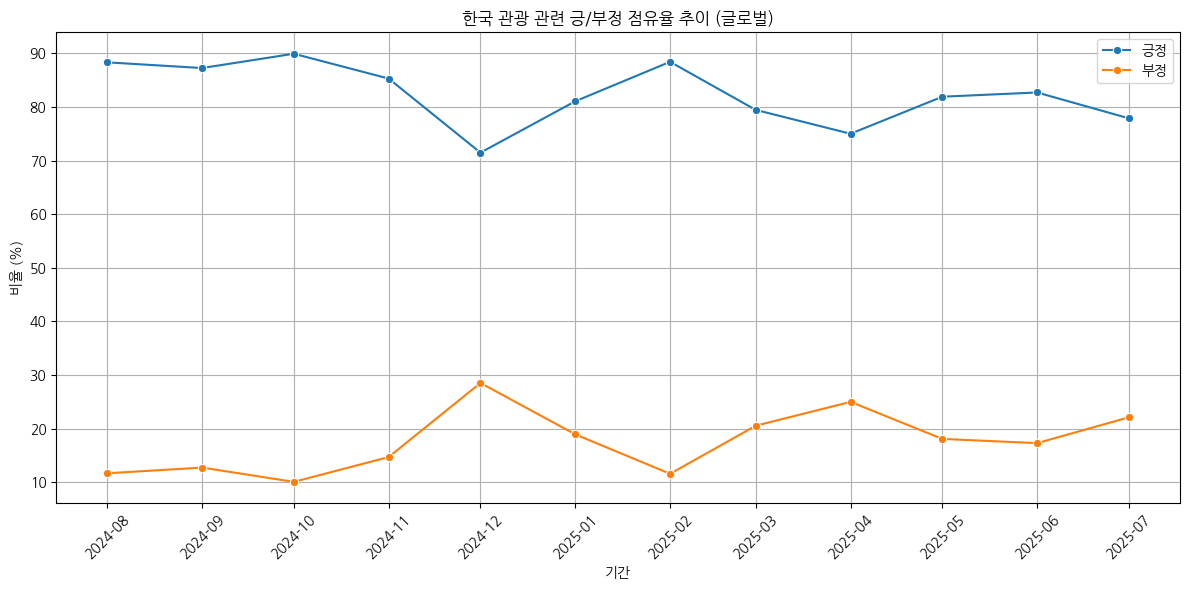
-> 전반적으로 긍정이 높지만, 특정 시기에 부정 반응이 상승
4. 성별 & 연령별 관광객 분포# 1. 세그먼트별 집계 (성별, 연령, 목적) import pandas as pd import seaborn as sns import matplotlib.pyplot as plt import matplotlib.font_manager as fm# 성별-연령대별 집계 segment_gender_age = df_monthly.groupby(["성별", "연령별"])["인원수"].sum().reset_index() plt.figure(figsize=(10,6)) sns.barplot(data=segment_gender_age, x="연령별", y="인원수", hue="성별", palette="Set2") plt.title("성별 & 연령별 관광객 분포") plt.xticks(rotation=45) plt.show()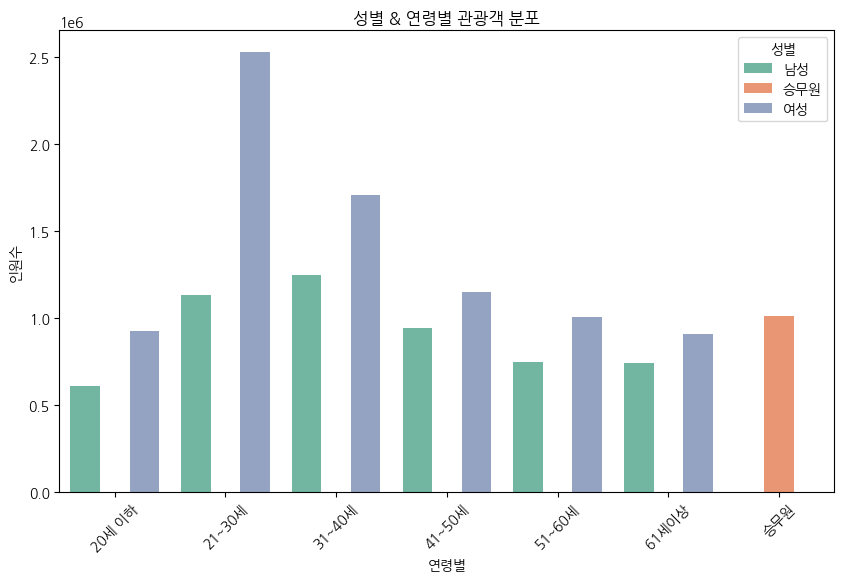
-> 여성·20~30대가 핵심 세그먼트
# 목적별 집계
segment_purpose = df_monthly.groupby("목적별")["인원수"].sum().reset_index()

plt.figure(figsize=(8,6))
sns.barplot(data=segment_purpose, x="목적별", y="인원수", palette="viridis")
plt.title("방문 목적별 관광객 분포")
plt.show()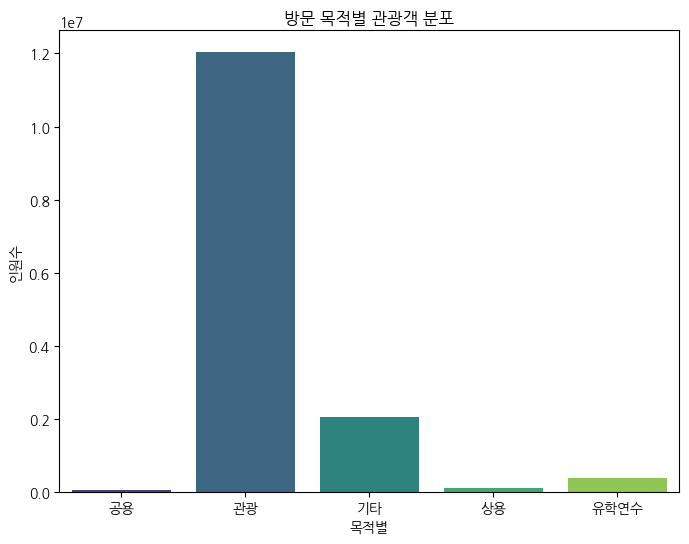
-> 관광 목적이 압도적, 그 외(상용/유학)는 소수
5. 관광객 수요예측# Prophet 기반 연도별 관광객 수요 예측 (2025년) from prophet import Prophet import matplotlib.pyplot as plt # 1. 연도별 관광객 집계 visit_by_year = df_visit.groupby("연도", as_index=False)["인원수"].sum() # 2. Prophet 입력용 데이터 변환 (연도 → datetime) df_prophet = visit_by_year.copy() df_prophet["ds"] = pd.to_datetime(df_prophet["연도"].astype(str) + "-01-01") df_prophet["y"] = df_prophet["인원수"] df_prophet = df_prophet[["ds", "y"]] # 데이터 확인 print(df_prophet.tail()) # 3. Prophet 모델 생성 및 학습 model = Prophet(yearly_seasonality=True, daily_seasonality=False, weekly_seasonality=False) model.fit(df_prophet) # 4. 미래 데이터프레임 생성 (향후 3년 → 2026, 2027, 2028 예측) future = model.make_future_dataframe(periods=3, freq="Y") forecast = model.predict(future) # 5. 예측 결과 시각화 fig1 = model.plot(forecast) plt.title("연도별 관광객 수요 예측 (Prophet, 2025 기준)") plt.show() # 6. 트렌드 및 계절성 분해 시각화 fig2 = model.plot_components(forecast) plt.show() # 7. 최신 예측 데이터 확인 (2023~2028년) forecast[['ds', 'yhat', 'yhat_lower', 'yhat_upper']].tail(8)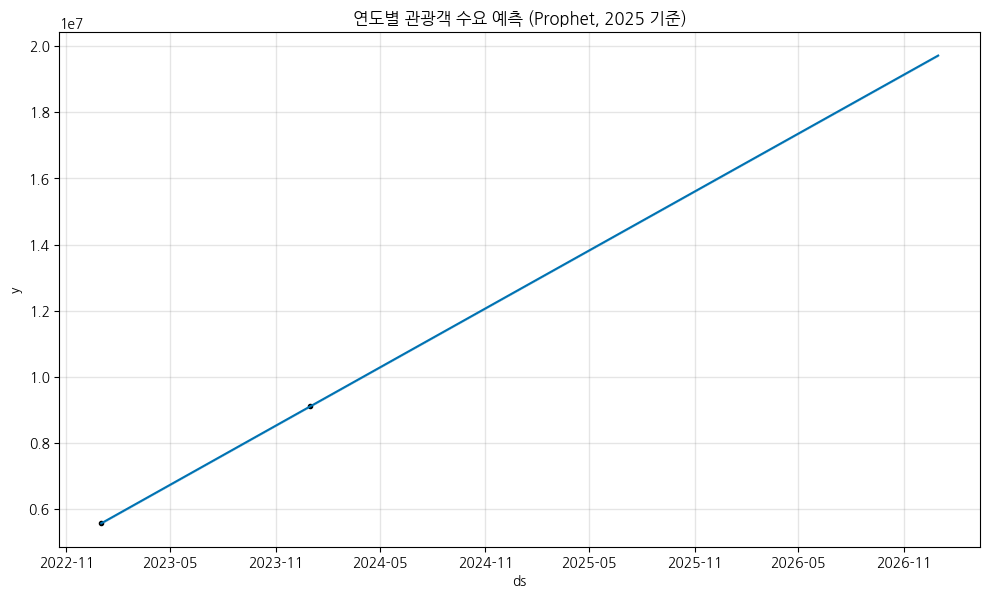

-> 2025~2026년에도 증가세 지속, 성장 기회 크다
6. 세그먼트 우선순위 랭킹
# 세그먼트 우선순위 점수(랭킹) – 23→24 규모+성장 기반

import pandas as pd
import numpy as np
import matplotlib.pyplot as plt
import matplotlib.font_manager as fm


# 0) 데이터 로드
try:
    df_visit
except NameError:
    df_visit = pd.read_csv("/content/drive/MyDrive/데이터분석/외래객방한데이터(한국관광공사)/한국관광공사_방한 외래관광객 상세 월별 집계.csv", encoding="cp949")
    df_visit["기준연월"] = pd.to_datetime(df_visit["기준연월"], errors="coerce")
    df_visit["연도"] = df_visit["기준연월"].dt.year

# 1) 기본 전처리: 불필요 카테고리 정리(승무원 등), 결측 제거
dfv = df_visit.copy()
if "성별" in dfv.columns:
    dfv = dfv[~dfv["성별"].isin(["승무원"])]
if "연령별" in dfv.columns:
    dfv = dfv[~dfv["연령별"].isin(["승무원", None, np.nan])]
dfv = dfv.dropna(subset=["연도","인원수"])

# 2) 파라미터
BASE_YEAR   = 2023
TARGET_YEAR = 2024
SEG_KEYS    = ["성별","연령별","목적별"]
W_SIZE, W_GROWTH = 0.6, 0.4               # 점수 가중치(규모 60%, 성장 40%)

# 3) 연도별 집계
g = (dfv.groupby(SEG_KEYS+["연도"])["인원수"]
        .sum()
        .reset_index())

# 4) Wide 변환(연도별 칼럼)
wide = (g.pivot_table(index=SEG_KEYS, columns="연도", values="인원수", aggfunc="sum")
          .fillna(0)
          .reset_index())

# 5) 지표 계산
if BASE_YEAR not in wide.columns:  wide[BASE_YEAR] = 0
if TARGET_YEAR not in wide.columns: wide[TARGET_YEAR] = 0

wide.rename(columns={
    BASE_YEAR: f"{BASE_YEAR}인원",
    TARGET_YEAR: f"{TARGET_YEAR}인원"
}, inplace=True)

# 성장률 계산 (분모 0인 경우 NaN 발생)
wide["YoY성장률"] = (wide[f"{TARGET_YEAR}인원"] - wide[f"{BASE_YEAR}인원"]) / wide[f"{BASE_YEAR}인원"]

# 분모가 0인 경우 (즉, 2023년 인원이 0인 경우):
# - 2024년 인원도 0이면 성장률 0
# - 2024년 인원이 0보다 크면 성장률 1 (무한대 성장을 1로 간주)
wide["YoY성장률"] = wide["YoY성장률"].fillna(0) # 기본적으로 NaN을 0으로 채우고

# 2023년 0명 -> 2024년 > 0 명 된 경우를 1로 업데이트
wide["YoY성장률"] = wide["YoY성장률"].where(
    ~((wide[f"{BASE_YEAR}인원"] == 0) & (wide[f"{TARGET_YEAR}인원"] > 0)),
    1.0
)


# 6) 정규화(0~1)
def minmax(s):
    lo, hi = s.min(), s.max()
    return (s - lo) / (hi - lo) if hi > lo else pd.Series(0.5, index=s.index)

wide["크기지수"]  = minmax(wide[f"{TARGET_YEAR}인원"])
wide["성장지수"]  = minmax(wide["YoY성장률"])

# 7) 종합 점수
wide["점수"] = W_SIZE*wide["크기지수"] + W_GROWTH*wide["성장지수"]

# 8) 분류 태그(해석용)
wide["분류"] = np.select(
    [
        (wide["크기지수"]>=0.5) & (wide["성장지수"]>=0.5),
        (wide["크기지수"]>=0.5) & (wide["성장지수"]<0.5),
        (wide["크기지수"]<0.5)  & (wide["성장지수"]>=0.5),
    ],
    ["Large & Fast","Large & Flat","Niche & Fast"],
    default="Niche & Flat"
)

# 9) 2024 점유율(비중)
total_2024 = wide[f"{TARGET_YEAR}인원"].sum()
wide["2024점유율(%)"] = np.where(total_2024>0, wide[f"{TARGET_YEAR}인원"]/total_2024*100, 0)

# 10) 랭킹 정렬 및 출력
ranked = (wide
          .sort_values("점수", ascending=False)
          .reset_index(drop=True))

print("✅ 세그먼트 우선순위 TOP 15")
display(ranked[SEG_KEYS+[f"{BASE_YEAR}인원",f"{TARGET_YEAR}인원","YoY성장률","크기지수","성장지수","점수","분류","2024점유율(%)"]].head(15))

# 10-1) 점유율 기준 랭킹 테이블 (추가)
ranked_share = (wide
                .sort_values("2024점유율(%)", ascending=False)
                .reset_index(drop=True))
print("✅ 세그먼트 점유율 기준 TOP 15")
display(ranked_share[SEG_KEYS + [f"{TARGET_YEAR}인원","2024점유율(%)","YoY성장률","점수","분류"]].head(15))
# 11) 시각화(Top 10, 정렬: 2024 점유율)
topN = 10
top_plot = ranked_share.head(topN).copy()
labels = top_plot.apply(lambda r: " / ".join([str(r[k]) for k in SEG_KEYS]), axis=1)
plt.figure(figsize=(10,6))
plt.barh(y=labels, width=top_plot["2024점유율(%)"])
plt.gca().invert_yaxis()
plt.title(f"세그먼트 점유율 Top {topN} (정렬: 2024 점유율)")
plt.xlabel("2024 점유율(%)")
# 막대 옆 보조 라벨: 점유율/24년 인원/YoY
for i, (p, cnt, yoy) in enumerate(zip(
    top_plot["2024점유율(%)"],
    top_plot[f"{TARGET_YEAR}인원"],
    top_plot["YoY성장률"]
)):
    plt.text(p + 0.3, i, f"{p:.1f}% | 24년 {cnt:,.0f}명 | YoY {yoy*100:.1f}%", va="center")
plt.tight_layout()
plt.show()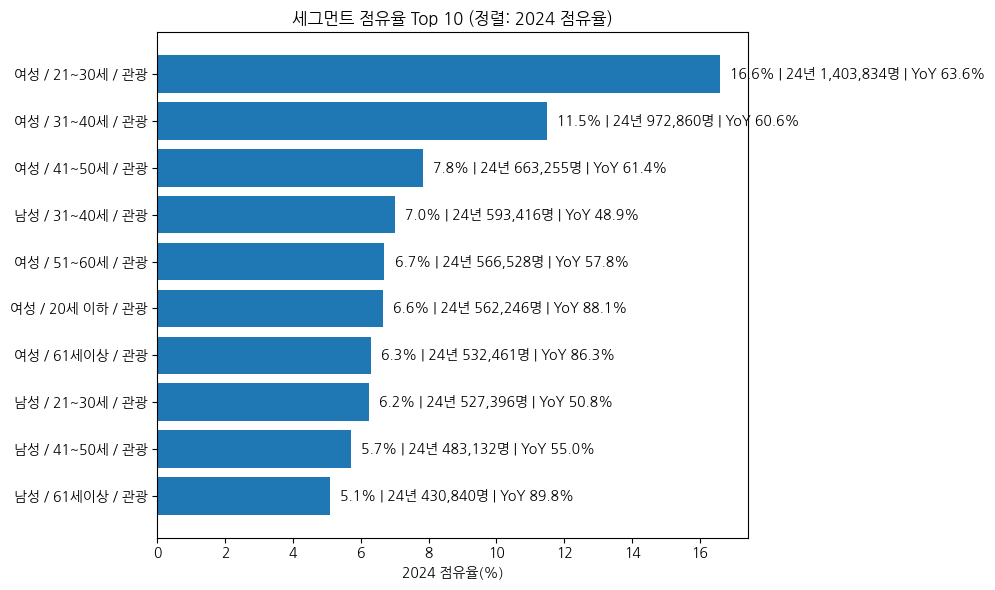
-> 여성 20~30대 관광 목적 방문객이 핵심 타겟
3주차 결과:
발견 단계
여성 20~30대 관광객이 가장 큰 규모이면서 빠른 성장세를 보인다.
남성 61세 이상, 20세 이하 관광객은 소규모지만 빠르게 성장 중이다.
4주차 계획:
- 검색량 데이터 적재 → 표준화 저장
- 상위 세그먼트 MA(3) 베이스라인 백테스트
- 예산 시뮬레이터 테이블/그래프 생성
- 대시보드 스켈레톤 파일 뼈대 만들기
'마케터 관점의 데이터분석 > 데이터분석 프로젝트' 카테고리의 다른 글
6. 데이터 분석가 프로젝트 7주차 수행일지 (1) 2025.09.26 5. 데이터 분석가 프로젝트 6주차 수행일지 (0) 2025.09.19 4. 데이터 분석가 프로젝트 5주차 수행일지 (3) 2025.09.12 3. 데이터 분석가 프로젝트 4주차 수행일지 (4) 2025.09.05 1. 데이터 분석가 프로젝트 1~2주차 수행일지 (4) 2025.08.19